Wednesday, 1 July 2020

Finlandia Y Varanger (Noruega) 6 (2006) Encuentro Con El Fiordo De Varanger

Faro en el fiordo Varanger.  Foto: C.M. Aguilar Gómez.
Al cruzar a Noruega dejamos atrás la taiga. Aparecieron los suelos quemados por la nieve durante meses, la hierba recién brotada, los sauces enanos y los abedules arbustivos

El fiordo Varanger se presentó con un quietud extraña, con sus aguas como una balsa de aceite. Dicen de él que no es un verdadero fiordo, que en sus orillas no aparecen las huellas del modelado glaciar, esos abruptos cortados tan característicos de los fiordos. Sus 100 km de longitud, a diferencia de lo que ocurre en otros fiordos de la zona, se orientan hacia el este y no hacia el norte. De ahí que actúe como un refugio frente a los temporales del norte.


Eider menor (P. stelleri) y común. Foto: Óscar Gutiérrez
Varanger es un lugar de invernada para muchos patos marinos de distribución ártica. Allí pasan la estación más dura del año en sus aguas libres de hielo gracias a la corriente del golfo. La misma que atempera el clima y hace que esas latitudes de Noruega sean habitables para el hombre.

En las aguas del fiordo disfrutamos de numerosos limícolas y patos marinos, entre ellos del eider común (Somateria mollissima) y del eider menor (Polysticta stelleri). Para esta última especie, Varanger es el único lugar de Europa donde es posible verlo, antes de que regrese a criar al este.


En los secaderos de bacalao. Foto: Diego Benavides.
Los días que pasamos en Varanger usamos la población de Vestre Jakobselv como base. Durante cuatro días recorrimos distintas zonas del fiordo, nos adentramos en la tundra del interior de la península y nos embarcamos hacia las colonias de aves marinas en costa este.

En los alrededores de Vestre Jakobselv pudimos ver los pintorescos secaderos de bacalao, habituales también en otras zonas costeras de Noruega. El bacalao es otro de los animales que tienen mucho que agradecer a la corriente del golfo. Las capturas se dejan secar al sol y al viento en unas estructuras de madera que constituyen un sistema barato y práctico sin recurrir al salado.


Puerto Vestre Jakobselv.  Foto: C.M. Aguilar Gómez.
Otro de los atractivos del fiordo son sus luces. Los atardeceres se prolongaban durante horas y su luz cálida sacaba los vivos colores con que pintaban las casas. Parece como si sus habitantes tuvieran  que alegrar sus viviendas con rojos, azules y amarillos intensos para resarcirse, por unos meses, de tanta oscuridad del invierno.

En junio las luces de tarde parecían eternas. El sol se posaba en el  horizonte despacio, sin llegar a ocultarse y, al cabo de unas horas, volvía a salir de nuevo. Sentir el ambiente irreal del sol de medianoche es algo que no se olvida fácilmente.More articles

Tuesday, 30 June 2020

Ethical hacking : Top 10 best websites to learn hacking

  1. The Hacker News: The Hacker News — most trusted and widely-acknowledged online cyber security news magazine with in-depth technical coverage for cybersecurity.
  2. SecTools.Org: List of 75 security tools based on a 2003 vote by hackers.
  3. Phrack Magazine: Digital hacking magazine.
  4. KitPloit: Leading source of Security Tools, Hacking Tools, CyberSecurity and Network Security.
  5. Exploit DB: An archive of exploits and vulnerable software by Offensive Security. The site collects exploits from submissions and mailing lists and concentrates them in a single database.
  6. HackRead: HackRead is a News Platform that centers on InfoSec, Cyber Crime, Privacy, Surveillance, and Hacking News with full-scale reviews on Social Media Platforms.
  7. Hakin9: E-magazine offering in-depth looks at both attack and defense techniques and concentrates on difficult technical issues.
  8. Metasploit: Find security issues, verify vulnerability mitigations & manage security assessments with Metasploit. Get the worlds best penetration testing software now.
  9. Hacked Gadgets: A resource for DIY project documentation as well as general gadget and technology news.
  10. Packet Storm: Information Security Services, News, Files, Tools, Exploits, Advisories and Whitepapers.

Thursday, 11 June 2020

wpCrack - Wordpress Hash Cracker


Wordpress Hash Cracker.

Installation
git clone https://github.com/MrSqar-Ye/wpCrack.git


Video


Related posts
  1. Pentest Lab Setup
  2. Hacking Apps
  3. Hacking With Raspberry Pi
  4. Hacker Types
  5. Hacking Health
  6. Pentest Azure
  7. Hacking The Art Of Exploitation
  8. Hacker Computer
  9. Pentest Report
  10. Pentestbox

FOOTPRITING AND INFORMATION GATHERING USED IN HACKING

WHAT IS FOOTPRITING AND INFORMATION GATHERING IN HACKING?

Footpriting is the technique used for gathering information about computer systems and the entities they belongs too. 
To get this information, a hacker might use various tools and technologies.

Basically it is the first step where hacker gather as much information as possible to find the way for cracking the whole system or target or atleast decide what types of attacks will be more suitable for the target.

Footpriting can be both passive and active.

Reviewing a company's website is an example of passive footprinting, 
whereas attempting to gain access to sensititve information through social engineering is an example of active information gathering.

During this phase hacking, a hacker can collect the following information>- Domain name
-IP Addresses
-Namespaces
-Employee information 
-Phone numbers
-E-mails 
Job information

Tip-You can use http://www.whois.com/ website to get detailed information about a domain name information including its owner,its registrar, date of registration, expiry, name servers owner's contact information etc.

Use of  Footprinting & Information Gathering in People Searching-
Now a days its very easy to find anyone with his/her full name in social media sites like Facebook, Instragram,Twitter,Linkdedin to gather information about date of birth,birthplace, real photos, education detail, hobbies, relationship status etc.

There are several sites like PIPL,PeekYou, Transport Sites such as mptransport,uptransport etc and Job placement Sites such as Shine.com,Naukari.com , Monster.com etc which are very useful for hacker to collect information about anyone.  
Hacker collect the information about you from your Resume which you uploaded on job placement site for seeking a job as well as  hacker collect the information from your vehicle number also from transport sites to know about the owner of vehicle, adderess etc then after they make plan how to attack on victim to earn money after know about him/her from collecting information.


INFORMATION GATHERING-It is the process of collecting the information from different places about any individual company,organization, server, ip address or person.
Most of the hacker spend his time in this process.

Information gathering plays a vital role for both investigating and attacking purposes.This is one of the best way to collect victim data and find the vulnerability and loopholes to get unauthorized modifications,deletion and unauthorized access.


Related articles


  1. Rapid7 Pentest
  2. Hacking Jailbreak
  3. Pentestmonkey Cheat Sheet
  4. Pentest Tools Framework
  5. Pentest Ubuntu
  6. Hacking Page
  7. Hacking Language
  8. Pentest Aws

Wednesday, 10 June 2020

15 Hidden Android Features You Should Know

While Android has matured by leaps and bounds, it's still going through the refinement phase. Over time, Google has both added and removed many popular features in Android. Sometimes the features are completely removed. However, in many cases, they make it to the Settings page or they are buried under different hidden places inside Android. That's why we have come up with this article where we unearth 15 hidden Android features that are quite interesting and helpful. So, let's go ahead and explore some unique Android features which are available on our Android devices.


Hidden Android Features

Here, we have mentioned several hidden Android features ranging from privacy, security, ease of use and more. Further, we have also added some obscure Android features which were released recently but might have gone under the radar. Now with that said, here are the hidden Android features that you should know and use often.

1. Block Spam Calls

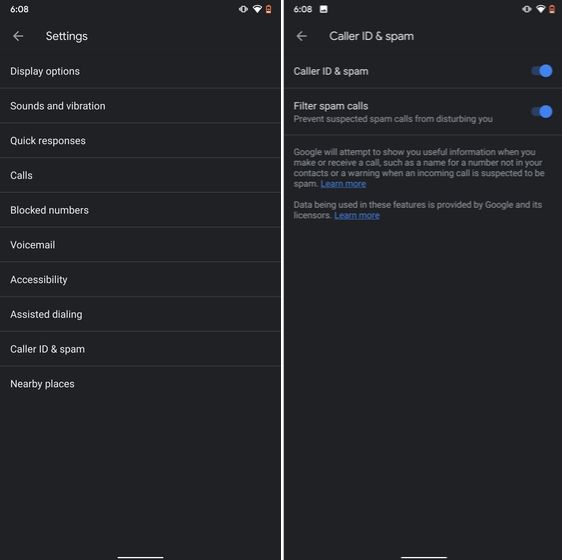
The one feature that I turn on whenever I set up a new Android device is: filter spam calls. It saves me from unwanted calls by telemarketers, fraudsters and spammers. If you use a stock Android device, you must have the Phone app by Google installed as your default dialer. To enable spam call blocking, open the Phone app and tap on the three-dot menu on the top-right corner and open Settings. After that, open "Caller ID and spam" and enable both the toggles. Now, whenever you will receive a call by spammers, the screen won't light up or make any sound. It's almost like DND with Total Silence turned on.

1. Block Spam Calls hidden android features

If you are worried that you will miss important calls then fret not. I have been using this feature for a long time and I can vouch that it works flawlessly. While there are other apps like Truecaller with similar features, you should be wary against handing your data to third-party apps, especially given its shady past record.

2. Verification Code Autofill

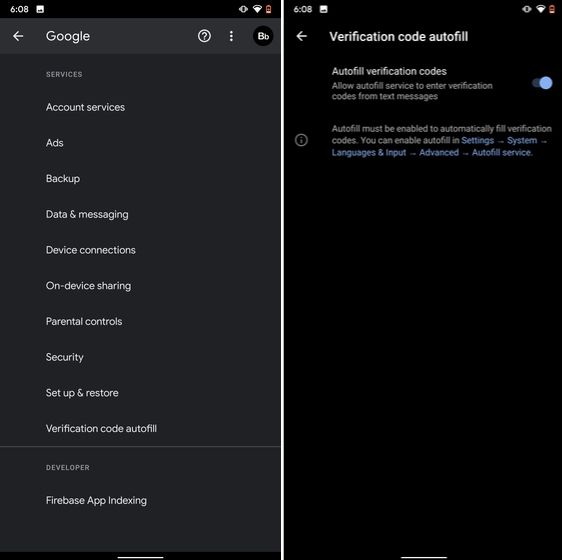
Many of us have allowed SMS permission to multiple apps for seamless OTP verification. However, this can lead to serious breach as apps can read all your text messages and also build credit profile without your consent. To crack down on this behavior, Google has brought a new API called the SMS Retriever. It allows apps to capture a one-time code without asking for SMS permission. In case, the app developer has not implemented this API, Google will act as a bridge and provide the verification code. That is awesome, right? So to enable this feature, navigate to Settings -> Google -> Verification Code Autofill and enable the toggle. Make sure you have also enabled the Autofill service by Google.

2. Verification Code Autofill

3. Force Dark Mode on all Apps

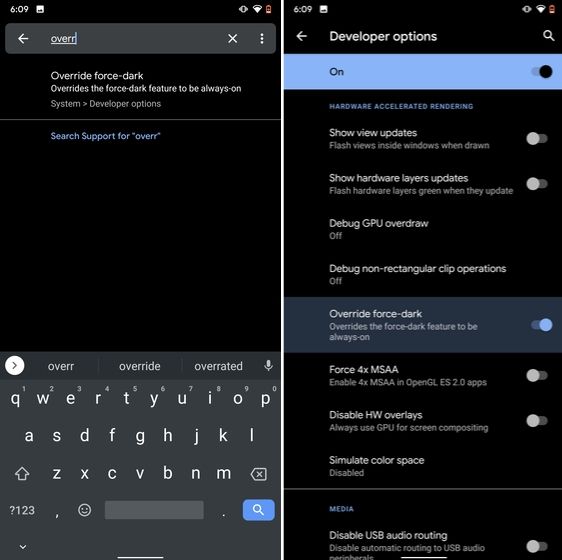
While the dark mode is slowly becoming the norm, there are still apps like Facebook and WhatsApp which are yet to embrace the dark side. If you want to force dark mode on a range of apps then there is a hidden Android setting that lets you do it. However, you must be on the latest Android 10 build. To enable dark mode for all the apps, navigate to Settings -> About Phone and tap on the Build Number for seven times continuously. A toast notification will show up prompting "Developer Options have been enabled". Now go back, and search for "Override force-dark" in the Settings page. Tap on the first result and then enable the toggle. Just to be sure, restart your device and check if dark mode is working on all apps.

3. Force Dark Mode on all Apps

4. Focus Mode

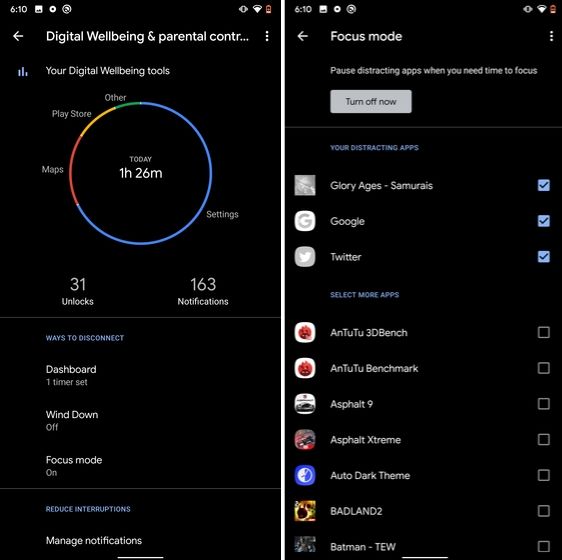
Google has brought a new feature called Focus Mode to Digital Wellbeing with the launch of Android 10. While Digital Wellbeing is great at limiting the screen time of various apps, Focus Mode allows you to block certain apps completely so you can focus on what you are doing. To configure Focus Mode, follow Settings -> Digital Wellbeing -> Focus Mode. Here, you can select apps that you find distracting and can enable Focus Mode straight from the Quick Settings panel.

4. Focus Mode hidden android features

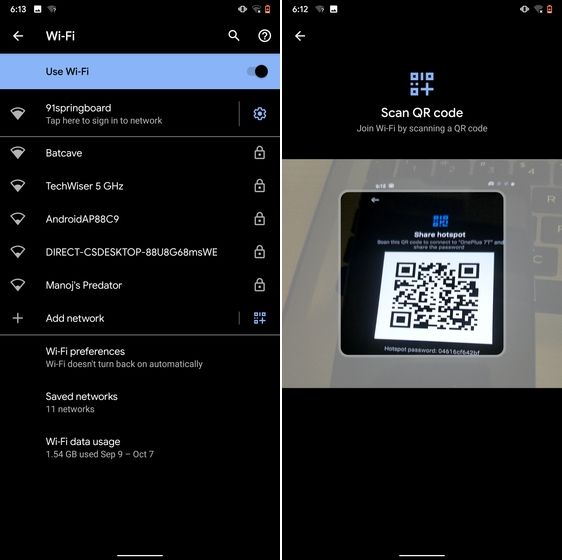
5. Share WiFi with QR Code

I know the feeling when someone asks you to share your WiFi's password and you can't seem to remember it. If you use a strong password with multiple hashes and characters then it becomes even more tedious to type it out. In such cases, a QR code can help you seamlessly connect to WiFi networks. Thankfully, Android 10 has this not-so-hidden feature under the WiFi Settings page. Open it and you will find the QR code scanner besides the "Add Network" section. Now, scan the QR code and you will be connected in no time.

5. Share WiFi with QR Code

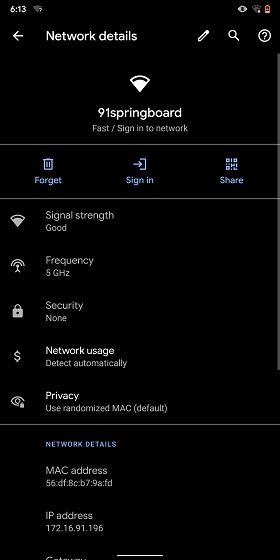
6. Randomize MAC Address

MAC address is a unique identifier assigned to WiFi-enabled devices including smartphones. Most devices come with a static MAC which can be exploited and used for tracking user movement. So having a random MAC address reduces the chance of tracking and strengthens your privacy. If you are running Android 10 then you can randomize the MAC address from the WiFi Settings page. Tap on the WiFi that you are connected to and open "Privacy". Here, make sure "Use randomized MAC" is your default pick.

6. Randomize MAC Address

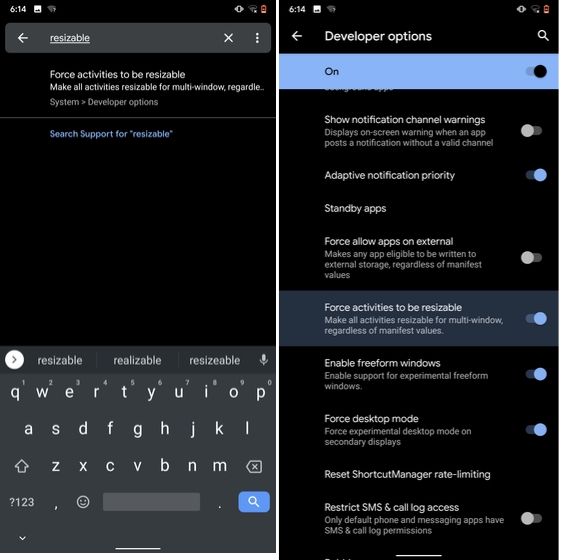
7. Force Apps to Resize in Split Mode

Android has some unique features like Split Mode which make it quite distinct from iOS. It lets you run two apps at once so you can effortlessly multitask between them. However, not all apps support Split Mode and that's where this hidden Android feature comes into play. With this feature, you can force any app to resize in split mode, irrespective of the app compatibility. So to enable this feature, open Settings and search for "resizable". Open the first result and enable "Force activities to be resizable". Now, restart your device and you can enjoy any app in the Split mode.

7. Force Apps to Resize in Split Mode

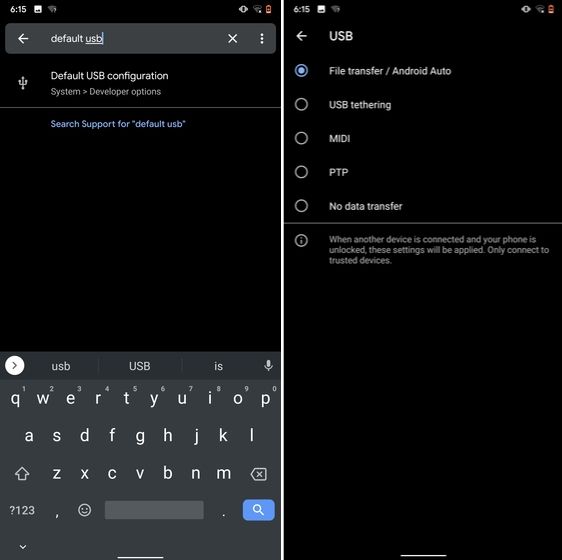
8. Default USB Configuration

If you are someone who regularly connects Android devices to PC then this sneaky feature is going to help you a lot. Android 10 now allows you to choose your default USB configuration. If you transfer files regularly then simply choose the desired settings and you are good to go. To configure USB, open Settings and search for "Default USB" and tap on the first result. Here, choose "File transfer" or any other settings based on your preference.

8. Default USB Configuration (2) hidden android features

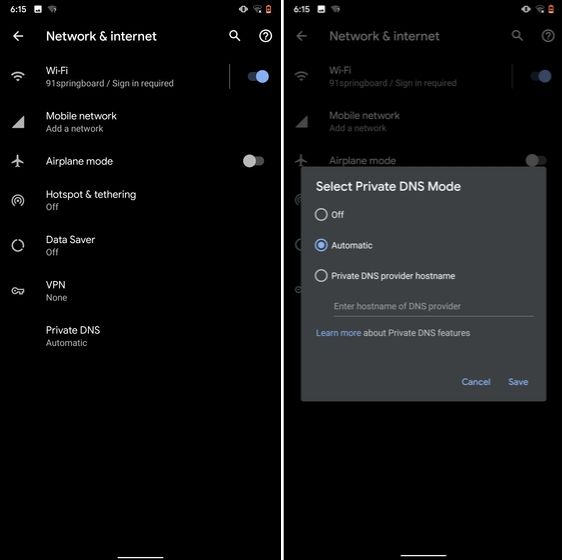
9. Private DNS

While Private DNS was launched with Android Pie, it still remains one of the least talked features of Android. It allows you to encrypt your DNS query so no one can read it, not even your internet service provider. You can find the Private DNS feature in the "Network and Internet" settings page. Here, open "Private DNS" and choose Automatic for Google's DNS or you can also select some other DNS providers as well. I would recommend you to go with Cloudflare's DNS.

9. Private DNS

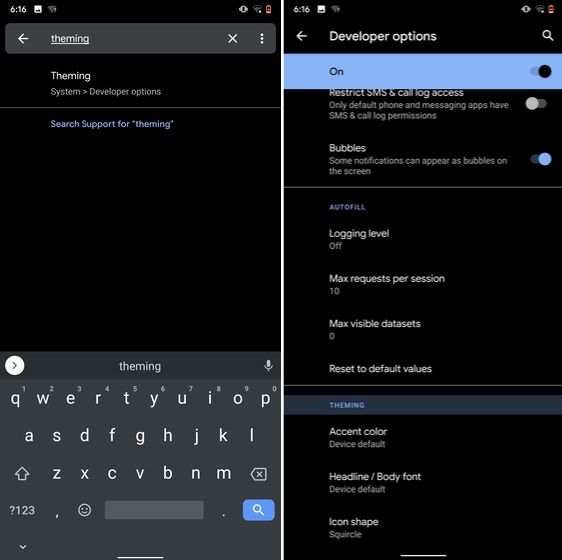
10. Device Theming

Device theming has finally arrived on Android, but it's still hidden under the developer options. You can change the accent color, font and icon shape from a handful of options. To find the desired settings page, open Settings and search for "theming". Tap on the top result and customize your Android device as you prefer.

10. Device Theming

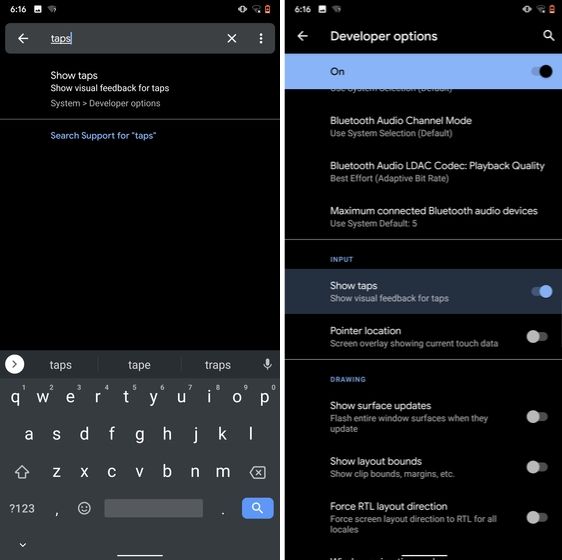
11. Show Taps While Screen Recording

With the release of Android Oreo, Google removed the ability to show taps while screen recording for security reasons. However, the settings to configure taps is still available and hidden under the developer options. Just open the Settings page and search for "taps". Open the first result and enable the toggle. Now, you can record your screen with taps and that's really convenient.

11. Show Taps While Screen Recording hidden android features

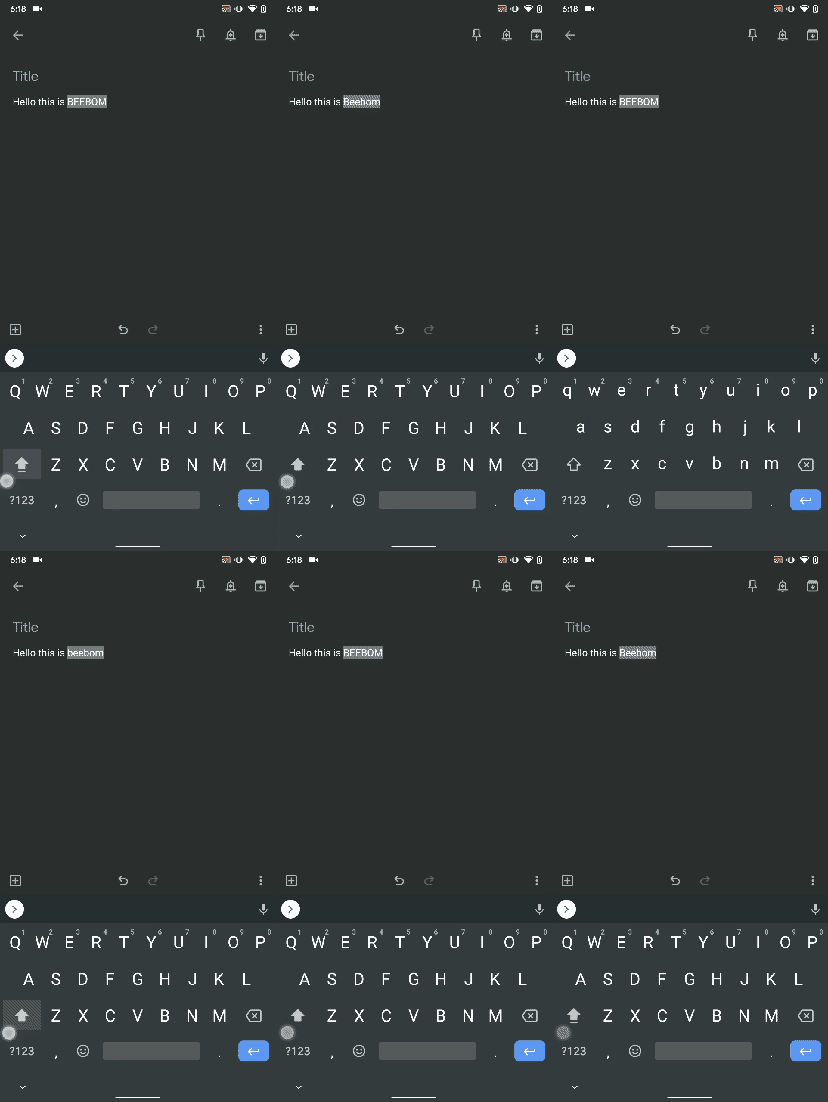
12. Capitalize Words Quickly

If you want to capitalize words quickly then Gboard has this nifty feature which is super helpful and I simply love it. Just select the words and tap the "Shift" button twice to capitalize a chunk of words at once. You can also make it lowercase by similarly double tapping the shift button. And if you just want to keep the initials capital then tap the shift button once. That's pretty great, right? So go ahead and type hassle-free with Gboard.

Capitalize Words Quickly

13. Uninstall Multiple Apps

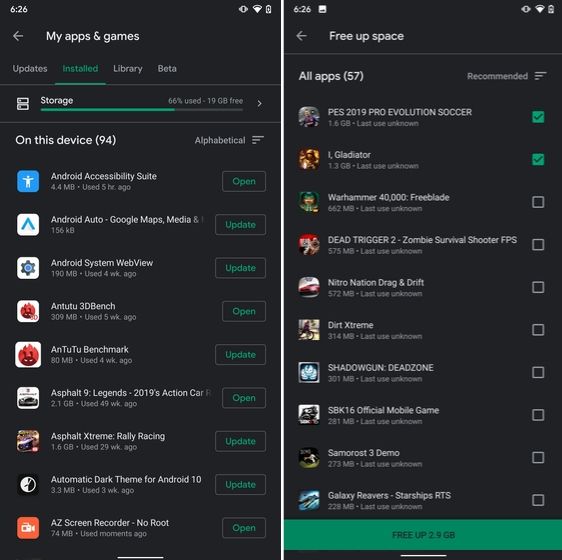
One of the best hidden Android features is that you can uninstall multiple apps at once. It works on older versions of Android as well so that is great. All you have to do is open the Google Play Store and tap on the hamburger menu and select "My apps and games". Here, switch to the "Installed" section and then tap on "Storage". After that, simply select apps that you want to uninstall and hit that "Free Up" button. Voila, multiple apps just got uninstalled in just one tap.

13. Uninstall Multiple Apps

14. Clear Site Storage Using Chrome

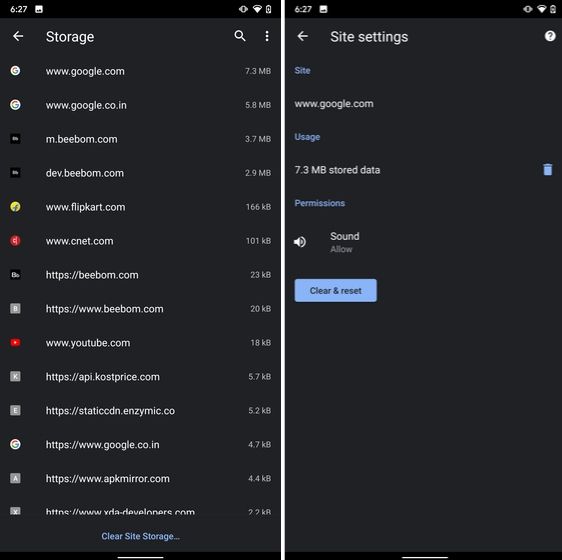
Chrome is notorious for accumulating a large amount of data in background which makes the performance worse and also takes up crucial storage space. If you want to check what websites are eating up your memory space then a hidden Chrome setting can help you with that. Open Chrome on your Android device and head over to its Settings page. Now, navigate to Site Settings and open Storage. Here, you will find all the websites with their storage space. Open any website and tap on the "Delete" icon to finally free up your internal storage from unnecessary cached data.

14. Clear Site Storage Using Chrome

15. Street View Layer in Google Maps

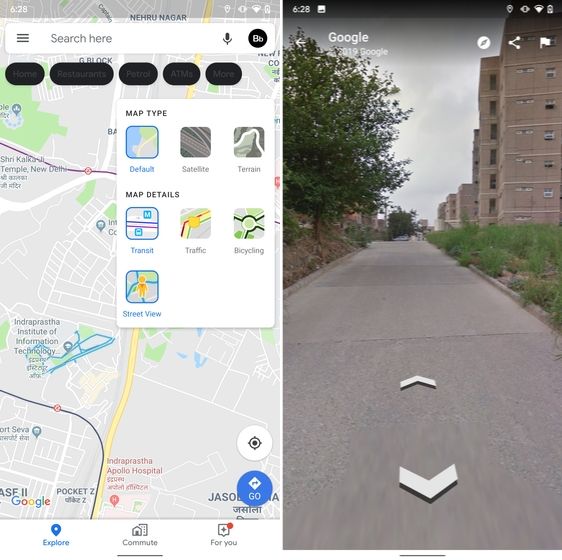
Street View is an immersive way to explore places and find new landmarks, hotels, restaurants from anywhere around the world. Now, the Street View Layer has been added to Google Maps and it works pretty well. To check if Street View is available in your region, open Google Maps and tap on the "layer" icon on the top-right corner. Now, tap on "Street View" icon and then zoom out to find blue lines on the map. Finally, tap on the blue lines and Street View will show up for that place. That's cool, right? So go ahead and check out Street View to find some hidden gems around the world.

15. Street View Layer in Google Maps hidden android features

Note: The blue lines show up wherever street view is available.

@EVERYTHING NT

Related posts
  1. Hacking Language
  2. Pentest App
  3. Pentest Dns Server
  4. Pentest Gear
  5. Hacking Wifi
  6. Pentest Methodology
  7. Basic Pentest 1 Walkthrough
  8. Pentest Vs Ethical Hacking
  9. Hacker Code
  10. Pentest App
  11. Pentest Jobs
  12. Hacking 3Ds
  13. Hacking To The Gate

new mug box

Hi Sir

We just made the new mug box,

Can i show you the pics?

Thanks in advance

Clark

5 Free Online Courses To Learn Artificial Intelligence

We are living in the era of fourth industrial revolution(4IR), where Artificial intelligence has a significant role to play. This 4IR technology embedded within societies and even into the human body. From Computer enthusiasts to common people, everyone should be aware and learn this breakthrough technology.
We think about gigantic Robots from Transformers when we hear about Artificial Intelligence(AI) which is a fiction in the past but a fact today, capable of transforming the whole tech world. The field of AI consists of more than Robots such as personal assistants, self-driving cars, apprenticeship learning, behavior cloning and so on. To learn about this advanced technology, thanks to the online learning resources which offers great content to get started with artificial intelligence.

Here are the 5 free e-learning courses on Artificial Intelligence

1. UC Berkeley CS188 Intro to AI

Get started with UC Berkeley AI course, this course is absolutely for beginners who are unaware of Artificial intelligence. It doesn't need any prior computer knowledge to know about AI. UC Berkeley allows anyone to learn this course for free. This course is systematically presented and consists of the following:
  • Course Schedule
  • Complete sets of Lecture Slides and Videos
  • Interface for Electronic Homework Assignments
  • Section Handouts
  • Specs for the Pacman Projects
  • Source files and PDFs of past Berkeley CS188 exams
  • Form to apply for edX hosted autograders for homework and projects (and more)
  • Contact information
Aside from this, you can also browse the following courses as well from UC Berkeley that are part of AI course:
  • Machine Learning: CS189, Stat154
  • Intro to Data Science: CS194-16
  • Probability: EE126, Stat134
  • Optimization: EE127
  • Cognitive Modeling: CogSci131
  • Machine Learning Theory: CS281A, CS281B
  • Vision: CS280
  • Robotics: CS287
  • Natural Language Processing: CS288

2. Artificial Intelligence: Principles and Techniques

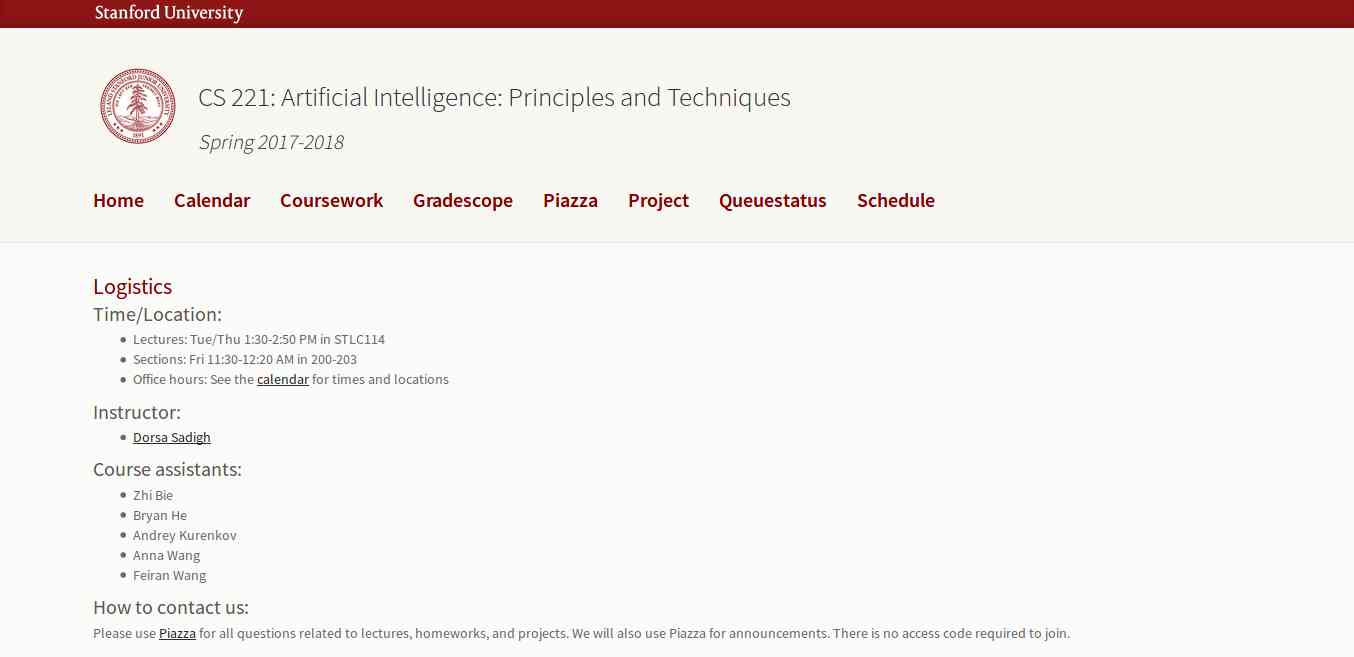
This course is offered by Stanford with great content that includes topics, videos, assignments, projects, and exams. The whole course mainly focuses on the complex real-world problems and try to find similarity between web search, speech recognition, face recognition, machine translation, autonomous driving, and automatic scheduling. Here you will learn the foundational principles of AI and implement some the AI systems. The goal of this course is to help you tackle the real-world situations with the help of AI tools. So, it is the best for the beginner to get started with AI.

3. Learn with GOOGLE AI

Who will dislike the course from Google? absolutely no one. This company is one of the early adopters of AI has a lot to offer to learners. Learn with Google AI is an education platform for people at all experience levels, it is free to access and browse content. The education resources provided by Google is from the machine learning experts of the company. These resources are the collections of lessons, tutorials, and Hands-on exercises that help you start learning, building, and problem-solving.

4. MIT 6.S094: Deep Learning for Self-Driving Cars

This course gives the practical overview of Deep Learning and AI. It is the course for beginners, also for the people who are getting started with Machine Learning. The course also offers a lot of benefits to the experienced and advanced researchers in the field deep learning. This MIT's course takes people into the journey of Deep Learning with the applied theme of building Self-Driving cars. However, the course also offers slides and videos to engage the learners.

5. Fundamentals of Deep Learning for Computer Vision

This course is offered by Nvidia and Nvidia Deep learning Institute. Computer Vision is one of the disciplines of AI that acquire, analyze, process, and understand images. The course is completely free and everyone who is enthusiast about AI can access and learn the course. It is a hands-on course that able to provide basics of deep learning and deployment of neural networks. With this. you will also learn the following:
  • Identify the ingredients required to start a Deep Learning project.
  • Train a deep neural network to correctly classify images it has never seen before.
  • Deploy deep neural networks into applications.
  • Identify techniques for improving the performance of deep learning applications.
  • Assess the types of problems that are candidates for deep learning.
  • Modify neural networks to change their behavior.
Related word

  1. Hacking Growth
  2. Hacking
  3. Pentest Free
  4. Pentest Process
  5. Pentestmonkey Cheat Sheet
  6. Pentest Plus
  7. Rapid7 Pentest
  8. Pentest Ios
  9. Hacker Ethic
  10. Pentesting And Ethical Hacking
  11. Pentest Vpn
  12. Pentest Methodology
  13. Hacking The Art Of Exploitation
  14. Pentest Bootcamp
  15. Pentest Example Report
  16. Hacker Anonymous
  17. Hacking 3Ds
  18. Hacking Books
  19. Pentest +